 Packetbrew
OSPF LSA Types and Stub Areas: The Complete Advanced Guide for Network Engineers
When you’re managing large-scale OSPF networks, understanding LSA types and stub areas isn’t just helpful—it’s essential. These advanced concepts separate network beginners from seasoned professionals who can design, optimize, and troubleshoot complex enterprise routing infrastructures.
Whether you’re pursuing CCNP certification or architecting real-world networks, this comprehensive guide will give you the deep understanding you need to master OSPF’s most powerful optimization features.
Understanding OSPF LSAs: The Foundation of Link-State Routing
Link State Advertisements (LSAs) are the detailed reports that OSPF routers share about network topology. Think of them as comprehensive neighborhood reports that each router creates and distributes, allowing every router to build an identical map of the entire network.
Every OSPF router collects these LSAs in its Link State Database (LSDB), creating that complete network topology we discussed in OSPF fundamentals. However, as networks grow, the sheer volume of LSAs can overwhelm routers and consume unnecessary bandwidth and processing power.
This is where understanding different LSA types and implementing stub areas becomes critical for network optimization.
The Essential OSPF LSA Types: Your Complete Reference
While OSPF defines 11 LSA types total, six types handle the vast majority of real-world networking scenarios. Let’s break down each type with practical examples and use cases.
Types 1 & 2: Local Area Information
These LSAs handle information within a single OSPF area—your local network neighborhood.
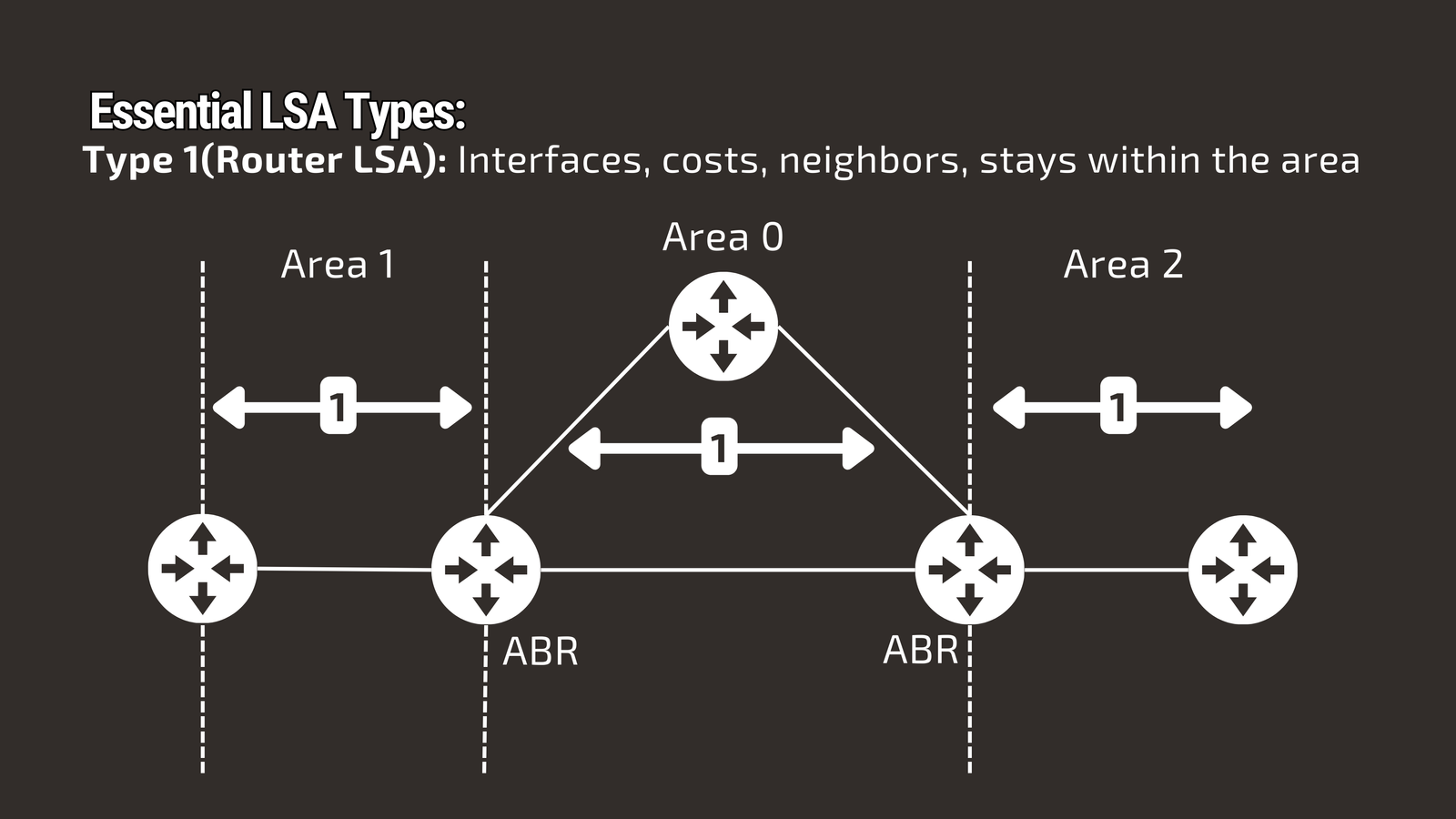
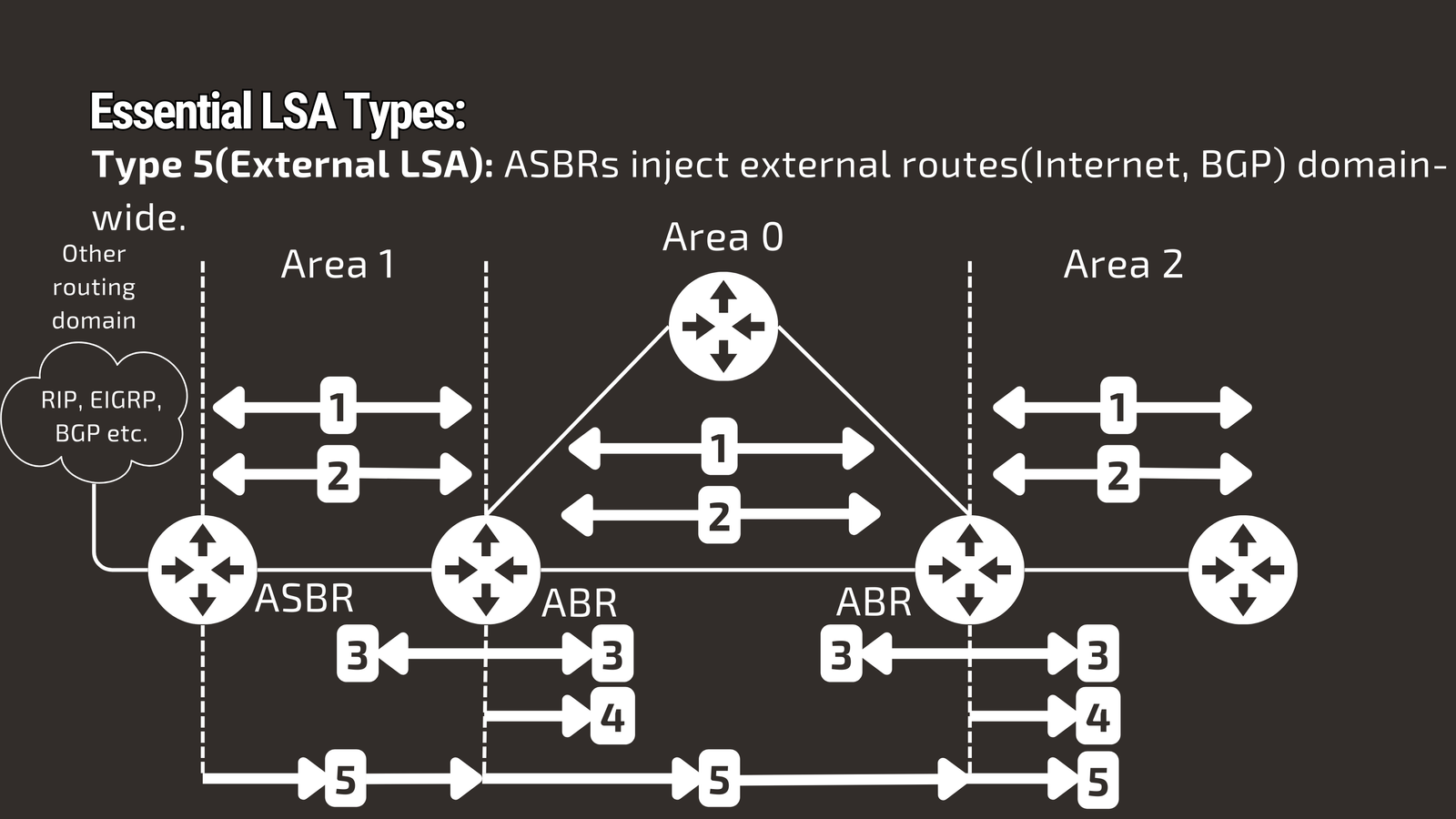
Type 1: Router LSA - Every Router’s Business Card
Generated by: Every OSPF router
Scope: Within the local area only
Contains: Router interfaces, costs, neighbor relationships, and directly connected networks
Type 1 LSAs are the foundation of OSPF. Every router creates one, essentially saying: “Here’s who I am, what I’m connected to, and how to reach me.”
This LSA floods throughout Area 1 but never crosses into Area 0 or other areas—it’s purely local information.
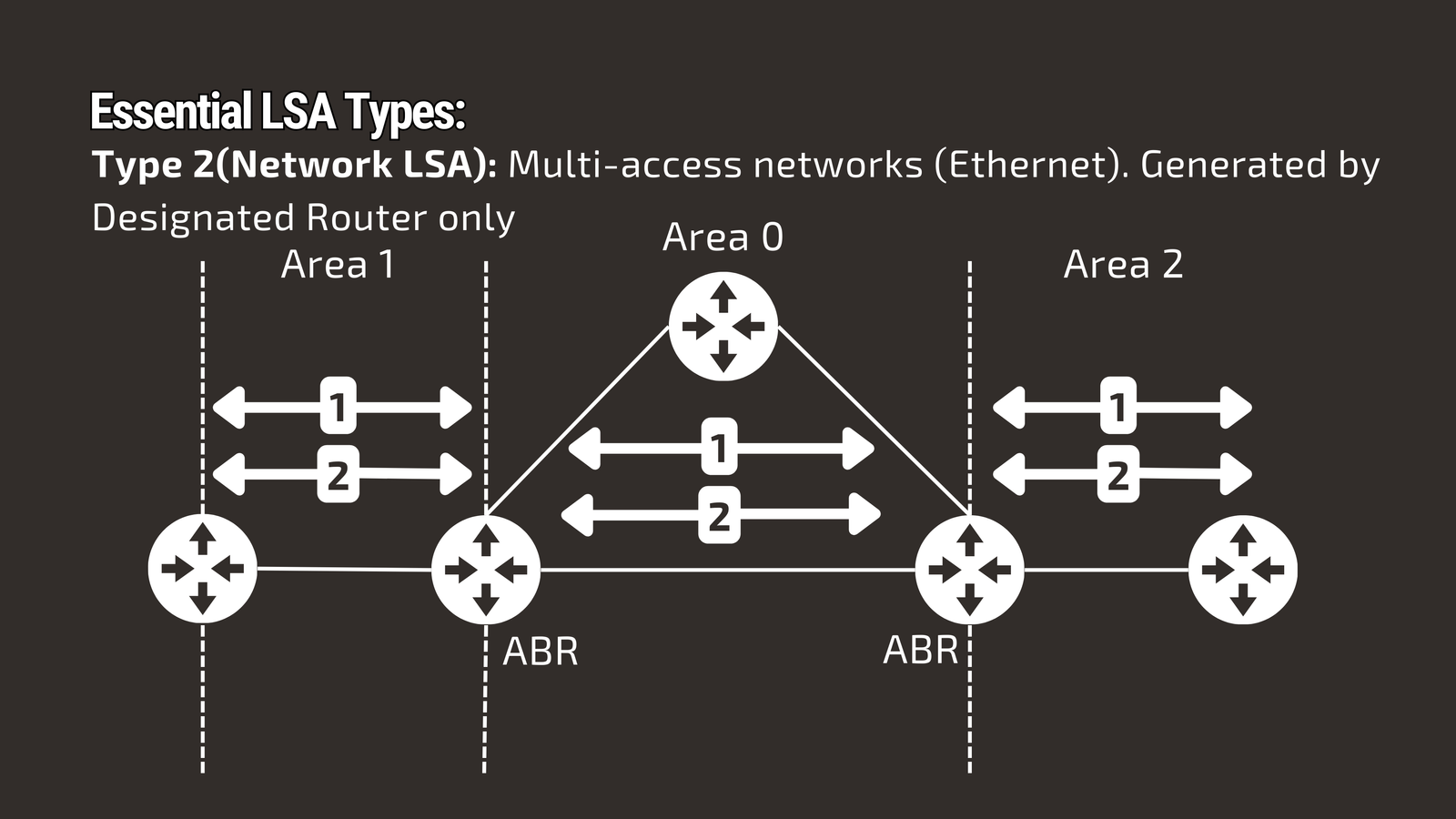
Type 2: Network LSA - Multi-Access Network Coordination
Generated by: Designated Router (DR) only
Scope: Within the local area
Purpose: Represents multi-access networks like Ethernet segments
On networks where multiple routers connect to the same segment (like an Ethernet switch), having every router advertise the same network would create redundancy and confusion. Instead, the elected Designated Router creates a single Type 2 LSA representing that network segment.
Types 3, 4 & 5: Inter-Area and External Routing
These LSAs handle information that crosses area boundaries and external route injection.
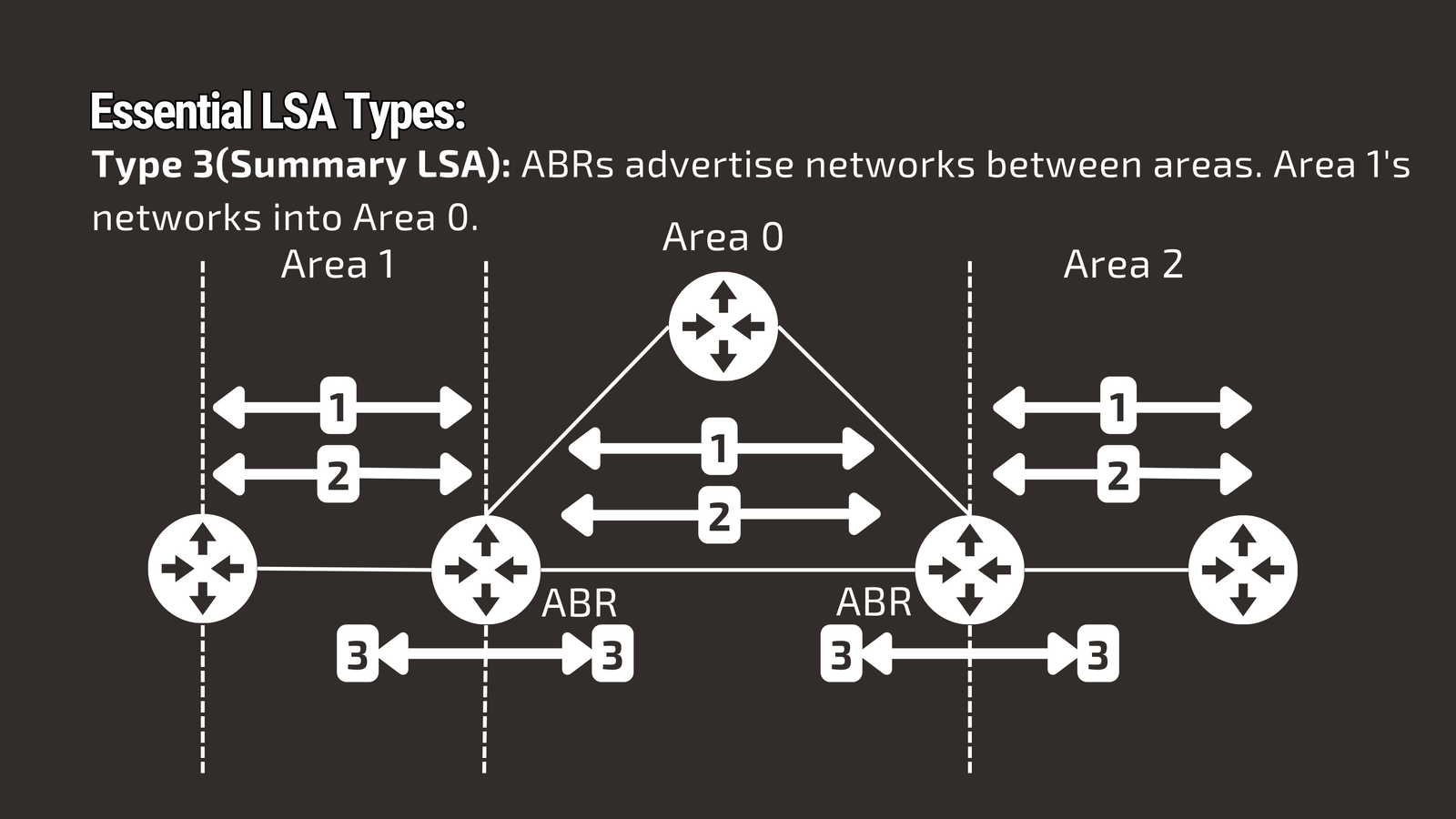
Type 3: Summary LSA - Inter-Area Route Advertisements
Generated by: Area Border Routers (ABRs) only
Scope: Between different OSPF areas
Purpose: Advertise networks from one area into adjacent areas
Type 3 LSAs are the messengers between OSPF areas. They carry summary information about networks in one area to routers in other areas, enabling inter-area connectivity while maintaining area isolation.
Critical concept: Type 3 LSAs contain summary information, not detailed topology. Routers in Area 0 learn about networks in Area 1 through Type 3 LSAs, but they don’t know Area 1’s internal router topology.
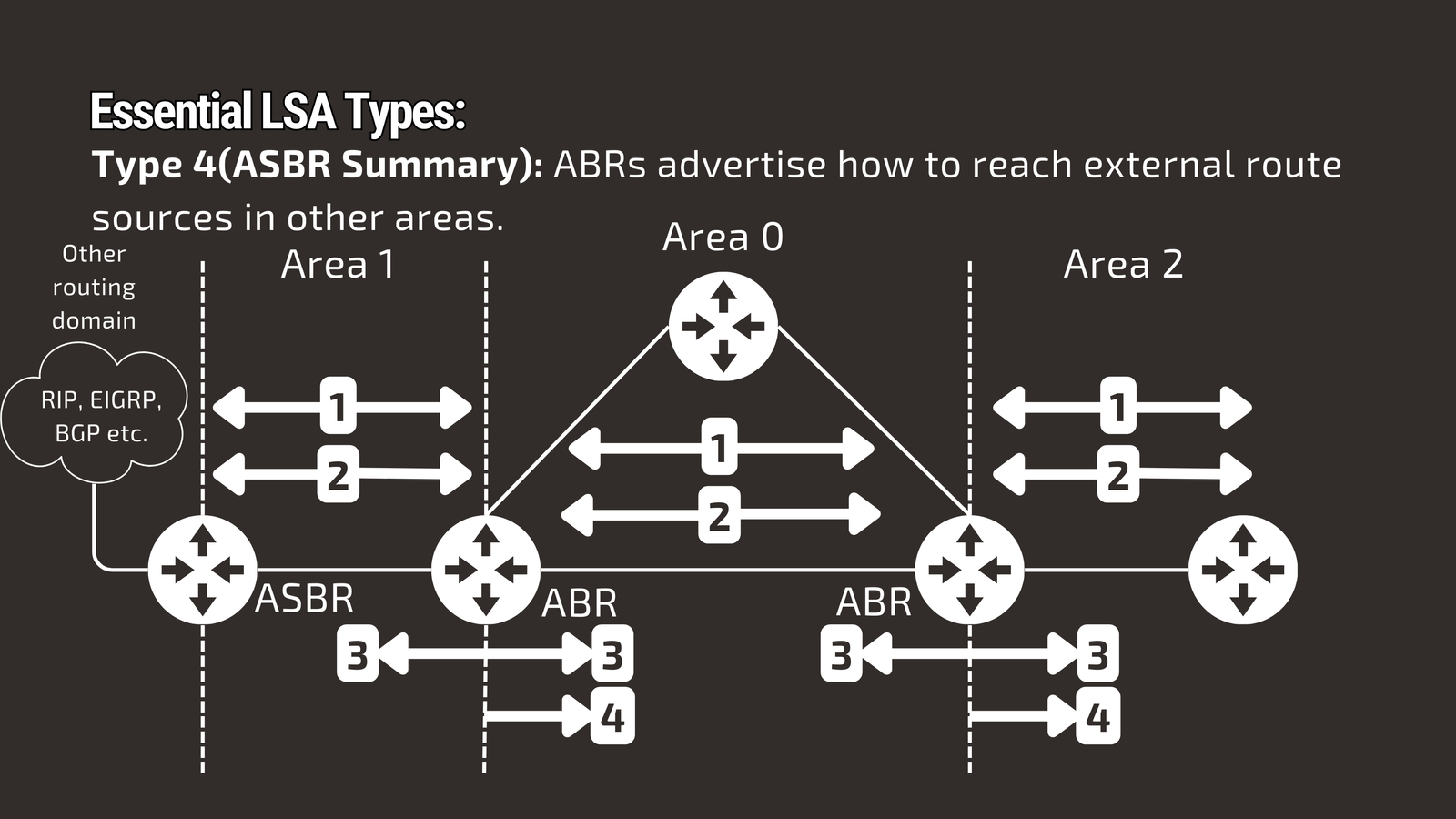
Type 4: ASBR Summary LSA - Path to External Route Sources
Generated by: ABRs
Scope: Between areas
Purpose: Advertise how to reach ASBRs (routers injecting external routes) in other areas
Type 4 LSAs solve a specific problem: when an ASBR in one area injects external routes, other areas need to know the path to that ASBR to reach those external destinations.
Type 5: External LSA - Routes from Outside OSPF
Generated by: ASBRs only
Scope: Domain-wide (floods everywhere except stub areas)
Purpose: Advertise routes from outside the OSPF routing domain
Type 5 LSAs bring external connectivity into OSPF networks. Common sources include:
- Static routes redistributed into OSPF
- BGP routes from ISP connections
- Other routing protocols (RIP, EIGRP)
- Default routes for Internet connectivity
Two important subtypes:
- E1 (External Type 1): Metric increases hop by hop through the OSPF domain
- E2 (External Type 2): Metric remains constant regardless of internal OSPF cost (default behavior)
Real-world example: Your company’s border router connects to an ISP and redistributes a default route (0.0.0.0/0) as a Type 5 LSA, providing Internet access to the entire OSPF domain.
The LSA Overload Problem: Why Stub Areas Matter
Here’s the challenge with Type 5 LSAs: they flood throughout the entire OSPF domain. In large networks with multiple Internet connections, hundreds of external routes, and complex topologies, these LSAs can create massive databases that overwhelm routers and consume significant bandwidth.
Consider a large enterprise with:
- 500+ routers across multiple areas
- 50+ Internet-connected sites
- Thousands of external routes from BGP
Every router must process and store every Type 5 LSA, even if many routers only need basic Internet connectivity through a default route.
Enter stub areas—OSPF’s elegant solution for database optimization.
OSPF Stub Areas: Database Optimization Strategies
Stub areas filter unnecessary LSAs while maintaining connectivity, dramatically reducing database size and improving network performance. Let’s explore each type with practical implementation guidance.
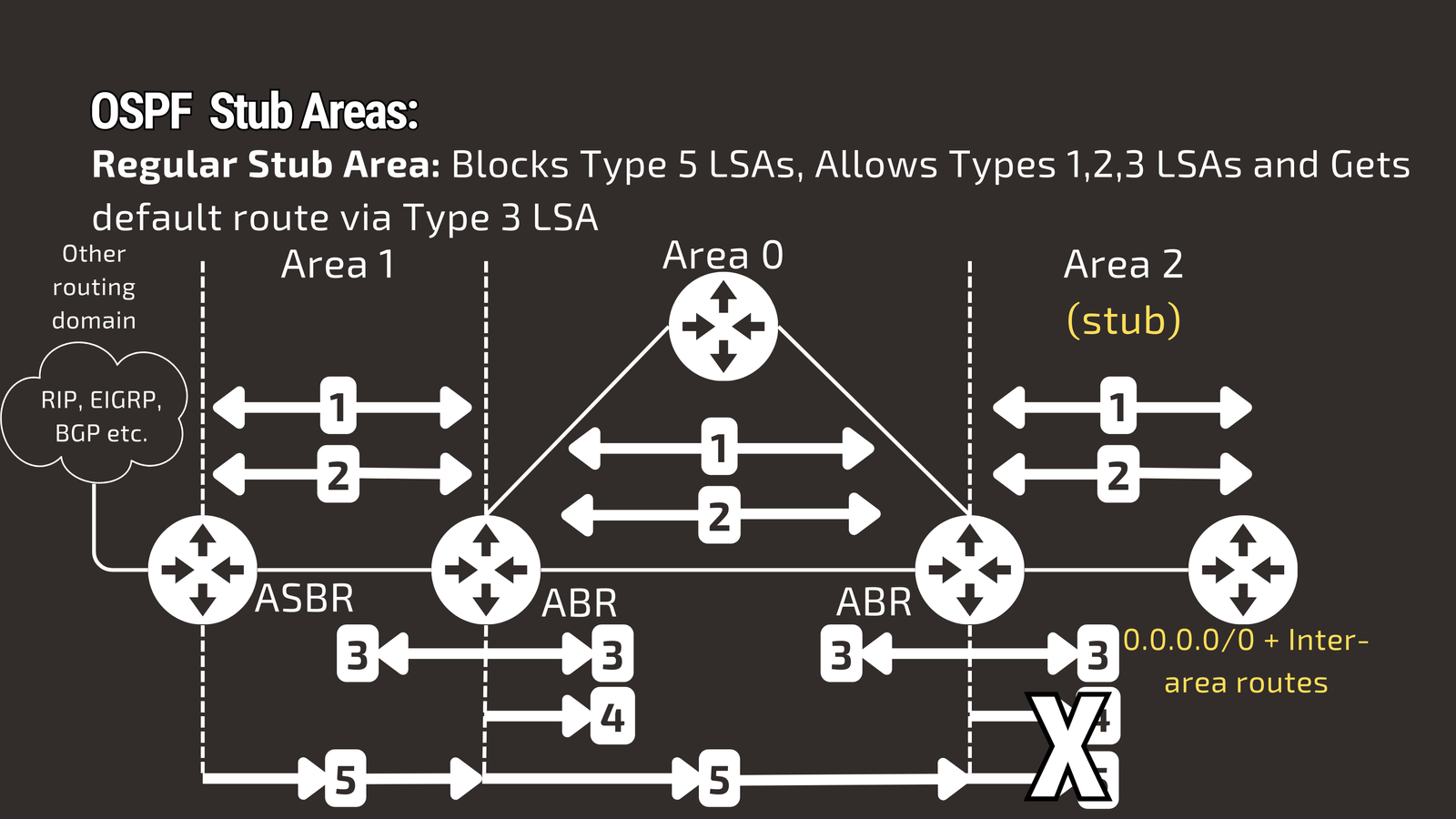
Regular Stub Areas: Blocking External Route Overload
Configuration characteristic: Blocks Type 5 LSAs while allowing inter-area connectivity
What gets filtered:
- Blocked: Type 5 LSAs (external routes)
- Allowed: Types 1, 2, 3, 4 LSAs
- Receives: Default route via Type 3 LSA for external access
Use case: Areas that need inter-area connectivity but don’t require detailed external routing information.
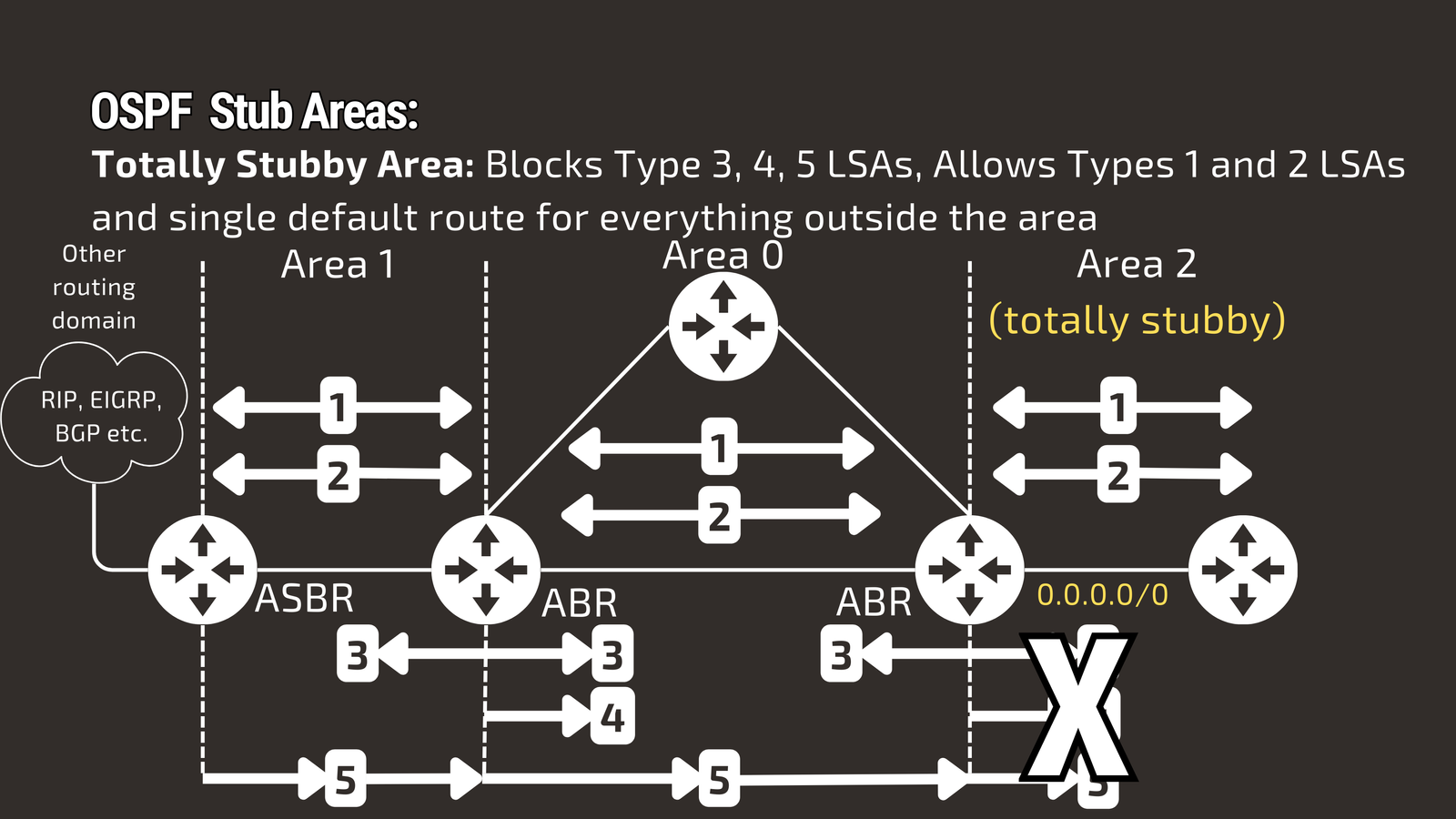
Totally Stubby Areas: Maximum Database Minimization
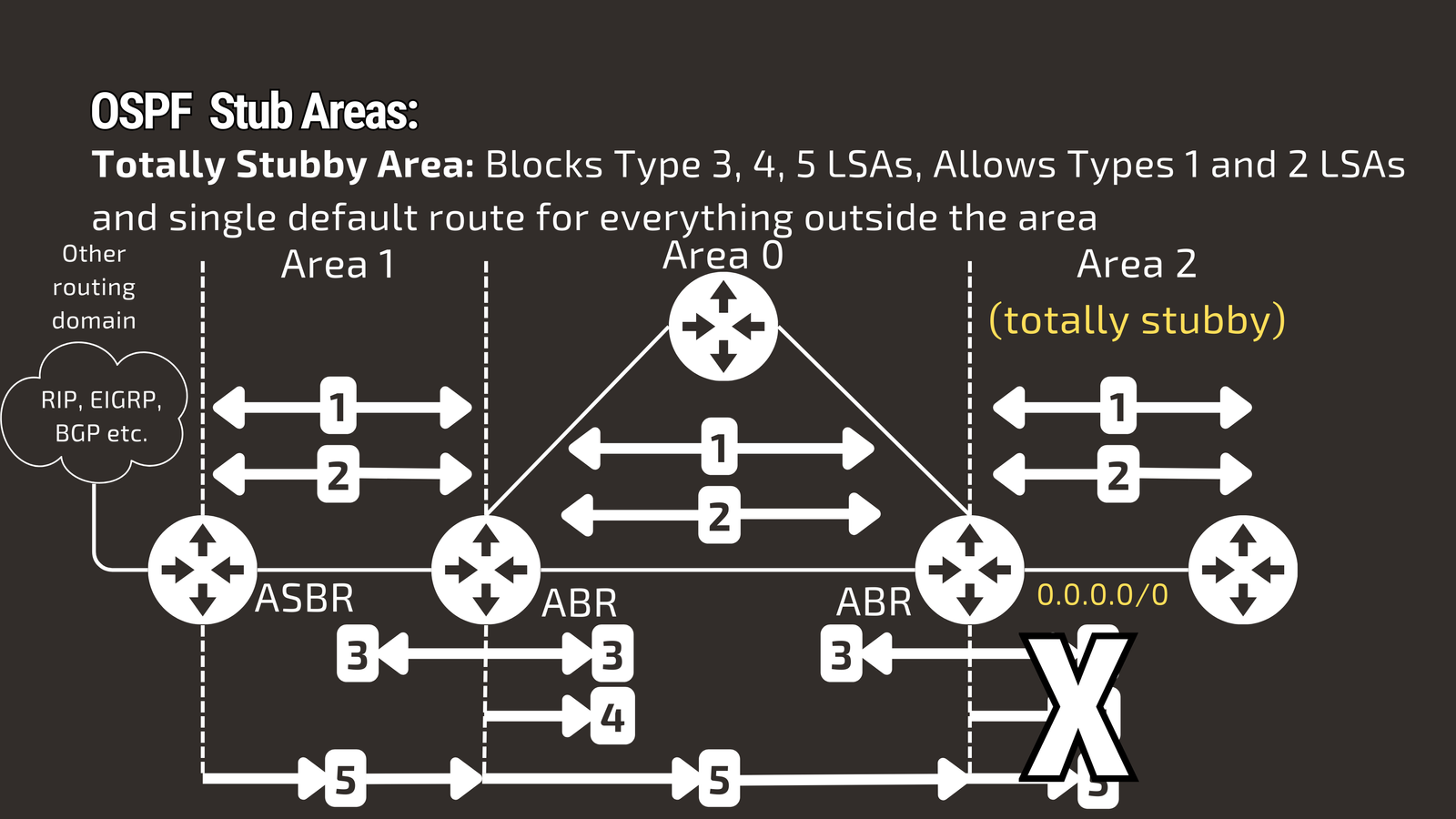
Configuration characteristic: Blocks Types 3, 4, and 5 LSAs for maximum optimization
What gets filtered:
- Blocked: Type 3, 4, 5 LSAs (inter-area and external routes)
- Allowed: Only Types 1, 2 LSAs (local area information)
- Receives: Single default route for everything outside the local area
Use case: Remote locations or branch offices that only need connectivity to headquarters through a single exit point.
Critical Stub Area Requirements
Before implementing any stub area type, ensure these requirements are met:
- Routers in the stub area must be configured as stub routers
- At least one ABR must be present to inject default routes
- No ASBRs can exist within stub or totally stubby areas
- Area 0 cannot become a stub or totally stubby area (backbone area requirement)
Not-So-Stubby Areas (NSSA): The Best of Both Worlds
NSSAs solve a common real-world problem: “I want stub area benefits, but I need to inject external routes locally.”
NSSA solution:
- Blocks: Type 5 LSAs from other areas
- Allows: Local external route injection via Type 7 LSAs
- Provides: Stub area database optimization benefits
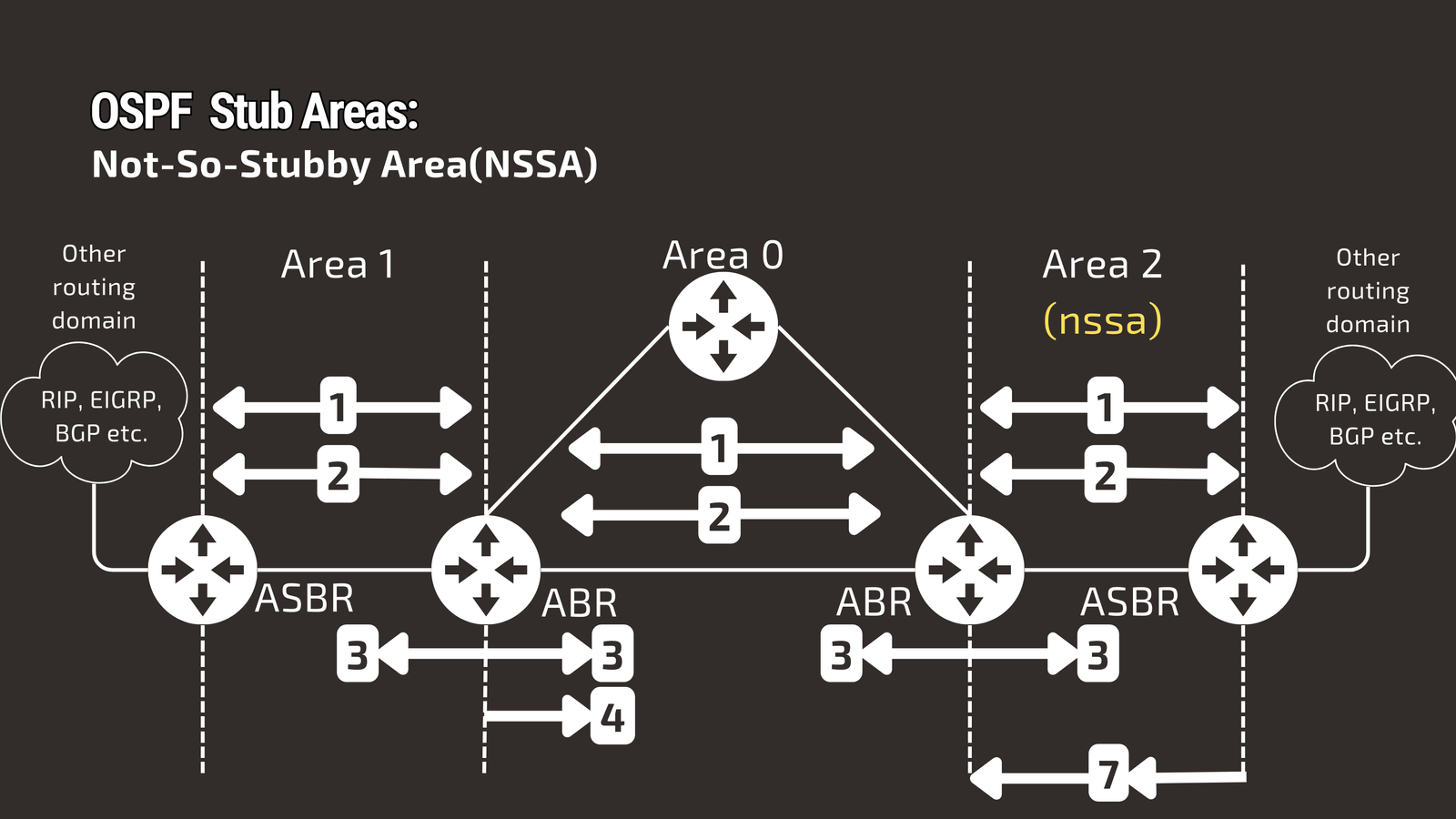
Advanced option: Totally Not-So-Stubby Areas block Type 3 LSAs while allowing local Type 7 LSAs, combining maximum database reduction with local external connectivity.
Type 7 LSA: NSSA’s Secret Weapon
Type 7 LSAs enable NSSA areas to inject external routes locally while maintaining stub area benefits. Understanding their operation is crucial for complex network designs.
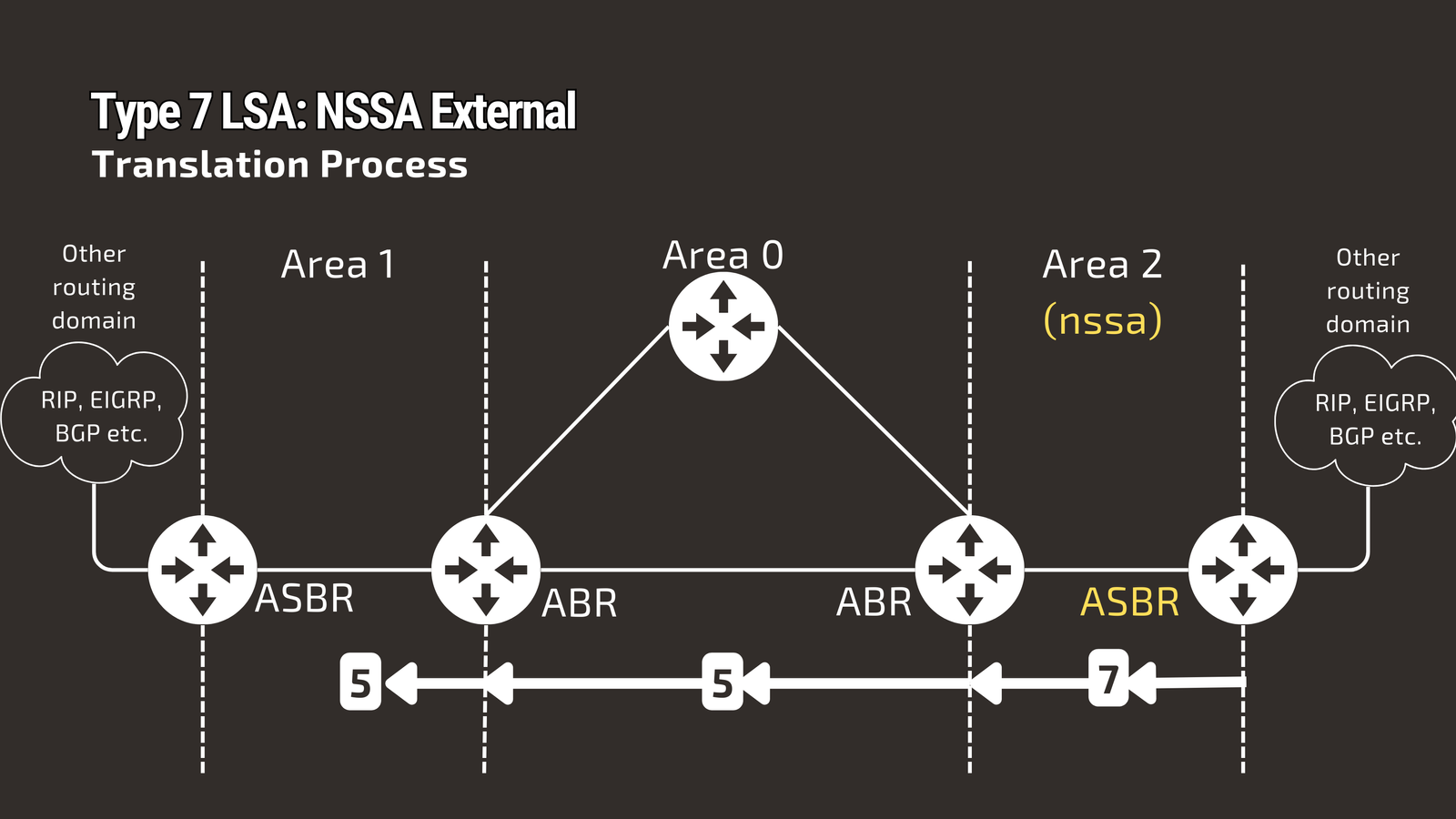
How Type 7 LSAs Work: The Translation Process
Step-by-step operation:
- ASBR in NSSA creates Type 7 LSA (not Type 5) for external routes
- Type 7 LSA floods within the NSSA area only
- ABR receives Type 7 LSA at area boundary
- ABR translates Type 7 to Type 5 when advertising to backbone area
- Other areas see the route as a normal Type 5 LSA
This translation process is transparent to other areas—they receive standard Type 5 LSAs and remain unaware of the NSSA configuration.
Type 7 LSA Benefits in Practice
Local external connectivity: NSSA routers can reach external destinations through local ASBR External LSA filtering: Still blocks Type 5 LSAs from other areas Database optimization: Significantly smaller LSDB compared to normal areas Design flexibility: Perfect for branch offices with ISP connections
Real-world example: Branch office with local Internet connection for backup. NSSA configuration allows local Internet access while blocking thousands of external routes from headquarters, reducing database size by 80% while maintaining full functionality.
LSA and Stub Area Decision Matrix
Understanding when to use each area type requires evaluating network requirements:
| LSA Type | Router LSA | Network LSA | Summary LSA | External LSA | NSSA External |
|---|---|---|---|---|---|
| Normal Area | ✅ | ✅ | ✅ | ✅ | ❌ |
| Stub Area | ✅ | ✅ | ✅ | ❌ | ❌ |
| Totally Stubby | ✅ | ✅ | ❌ | ❌ | ❌ |
| NSSA | ✅ | ✅ | ✅ | ❌ | ✅ |
| Totally NSSA | ✅ | ✅ | ❌ | ❌ | ✅ |
Area Type Selection Guide
Choose Normal Area when:
- Maximum routing information is required
- Area contains multiple ASBRs
- Complex routing policies are needed
- Area serves as a transit area for external routes
Choose Stub Area when:
- Inter-area connectivity is required
- External routes are unnecessary
- Database optimization is desired
- No local external route injection needed
Choose Totally Stubby when:
- Single exit point connectivity is sufficient
- Maximum database reduction is critical
- Limited router resources are available
- Simple connectivity requirements exist
Choose NSSA when:
- Local external route injection is required
- External route filtering from other areas is desired
- Stub area benefits are needed with external connectivity
- Branch offices have ISP connections
Configuration Best Practices and Troubleshooting
Essential Configuration Commands
Cisco IOS stub area configuration:
# Regular stub area
router ospf 1
 area 1 stub

# Totally stubby area (on ABR)
router ospf 1
 area 1 stub no-summary

# NSSA configuration
router ospf 1
 area 1 nssa

# Totally NSSA (on ABR)
router ospf 1
 area 1 nssa no-summary
Common Troubleshooting Commands
Verify LSA database:
show ip ospf database              # All LSAs
show ip ospf database router       # Type 1 LSAs
show ip ospf database network      # Type 2 LSAs
show ip ospf database summary      # Type 3 LSAs
show ip ospf database external     # Type 5 LSAs
show ip ospf database nssa-external # Type 7 LSAs
Verify area configuration:
show ip ospf                      # Area types and configuration
show ip ospf neighbor             # Neighbor relationships
Common Issues and Solutions
Adjacency problems in stub areas:
- Cause: Mismatched stub configuration between neighbors
- Solution: Ensure all routers in area have consistent stub configuration
Missing default routes:
- Cause: ABR not properly configured or reachable
- Solution: Verify ABR configuration and connectivity to backbone area
Type 7 to Type 5 translation issues:
- Cause: ABR configuration problems or routing loops
- Solution: Check ABR NSSA configuration and routing table for conflicts
Real-World Design Scenarios
Enterprise Branch Office Design
Scenario: 50-site enterprise with headquarters and regional branches
Design approach:
- Area 0: Headquarters with core routers and data center
- Area 1-10: Regional offices (stub areas)
- Area 11-50: Small branches (totally stubby areas)
- Area 100: Internet DMZ branch with local ISP (NSSA)
Result: 90% reduction in OSPF database size across branch offices while maintaining full connectivity and providing local Internet access where needed.
Service Provider Edge Design
Scenario: ISP providing MPLS services to enterprise customers
Design approach:
- Area 0: Provider backbone infrastructure
- Customer areas: NSSA configuration allowing customer route injection while filtering provider-internal routes
Result: Customers can inject their routes locally while being protected from provider routing table size and changes.
Network Convergence Benefits
Stub areas improve convergence times by:
- Reducing SPF calculations due to smaller databases
- Limiting LSA propagation scope during changes
- Minimizing routing table updates
- Decreasing memory and CPU utilization
Conclusion: Mastering Advanced OSPF for Real-World Success
Understanding LSA types and stub areas transforms you from someone who can configure basic OSPF to a network architect who can optimize large-scale routing infrastructures. These concepts are essential for:
Professional development: CCNP certification and senior network engineering roles Network optimization: Reducing database overhead and improving performance Design flexibility: Meeting diverse connectivity requirements efficiently Troubleshooting expertise: Diagnosing complex OSPF issues in production networks
Key Takeaways for Implementation
- Start with requirements analysis - understand connectivity needs before choosing area types
- Design hierarchically - use area types strategically based on location and function
- Monitor performance - measure database size and convergence improvements
- Plan for growth - choose area types that scale with network expansion
- Test thoroughly - validate stub area configurations in lab environments before production
Your Next Steps
Hands-on practice: Build multi-area OSPF topologies in GNS3 or Packet Tracer with different stub types Advanced study: Explore OSPF authentication, virtual links, and multi-vendor interoperability Real-world application: Analyze your current network for stub area optimization opportunities Certification preparation: Focus on CCNP ENARSI objectives covering advanced OSPF concepts
The journey from basic OSPF understanding to advanced optimization requires hands-on experience with these concepts. Start with simple stub area implementations, gradually building complexity as you master each area type.
Remember: the best network engineers don’t just know how to configure protocols—they understand why each feature exists and when to apply it for optimal results. LSA types and stub areas are perfect examples of this principle in action.
Ready to dive deeper into advanced OSPF concepts? Check out the video on this link https://youtu.be/K-RzSLFKuEE